

Features for brokers and general agencies
Everything that happens between renewal open and plans in force.
Ten steps, what the AI does at each one, and what your team still does. That's 10 to 15 hours back on every marketed employer renewal. See how.
How a renewal runs
Ten steps. What the AI does, and who owns it.
The whole marketed renewal in the order it happens, with the time each step takes by hand and with PlansightAI™.
01 · AI
Start the renewal
Surfaces the group on the dashboard on your rules: five months out for large group, three for small, or a window you set per client.
None
Today: 15 to 30 min
02 · AI
Spread current against renewal
Reads the renewal, normalizes it against the current plan, and builds a client-ready renewal presentation in your format.
Under 5 min
Today: 45 to 60 min
03 · AI, you review
Build the RFP
Assembles the RFP the moment the renewal lands. Each carrier gets the package that matches what they quote.
5 to 10 min review
Today: 60 to 90 min
04 · AI, you call
Distribute and follow up
Distribution is one click. Tracks every carrier as delivered, downloaded, quoted, or declined, with a reason; follows up on your rules up to 3 times, then hands you a task to call.
10 to 15 min
Today: 30 to 50 min
05 · AI, you QA
Manage carrier proposals
Carriers upload by link. The AI files each proposal, links it to the RFP, reads it, normalizes it, and ranks it low to high in the side-by-side. This is the largest block of manual time in the cycle.
10 to 15 min QA per proposal
Today: 45 to 60 min per proposal
06 · AI
Finalize the presentation
Builds itself against your templates, print-ready the moment a proposal lands.
15 to 20 min
Today: 45 to 60 min
07 · You, live
Review with the client
Every page recalculates live when the client asks what if.
5 to 10 min per scenario
Today: 20 to 40 min per scenario
08 · You decide, AI executes
Select and bind
Plans are selected with a click, and you approve. Winning and losing carriers are notified, and the elected plan data is pushed to your enrollment and AMS systems.
5 min per plan
Today: 20 to 30 min per plan
09 · AI, you flag
Audit the policy
SmartSheetingAI™ audits the certificate the carrier issued against the proposal they sold. Every variance links back to the document.
Under 2 min per plan
Today: 20 to 30 min per plan
10 · AI
Start the next cycle
Next year’s presentation was populated when this year’s plans were selected.
None
Today: 30 to 40 min
What you still do.
See every quote waiting on you.
The Tasks page shows each quote as pending, in progress, or ready for review, and filters by office, producer, account manager, or benefit type.
The other path
Community rated small group, built in.
Priced straight off the rating engine, with the same presentation at the end as a marketed renewal.
Start from the census
Upload it, or pull it from Employee Navigator. PlansightAI™ prices every plan in the group’s rating area, age banded or composite.
Narrow it the way you would by hand
Filter by carrier, network and deductible, and see each option against current.
Keep the census for next year
Save versions and reuse them, so next year’s quote starts from what you already built.
What it reads.
Every line of coverage the application extracts and normalizes today.
In these formats
Carrier quotes, SBCs and rate sheets
Word
.doc and .docx
Excel
.xls and .xlsx
Per file
Up to 50 MB
Per upload
Up to 30 files at once
And this is how they arrive
The carrier uploads by link
Every RFP goes out with a secure upload link. The carrier drags the quote in without an account and without emailing you, and it lands in your task list already read.
Or you upload them
Quotes that come in another way go in through the document upload, one at a time or thirty at once.
What comes out.
Three things leave the application, and you control the shape of all three.
A client-ready presentation as a PDF
Built against your templates and rebuilt the moment a proposal lands, with every page recalculating live when the client asks what if. Your own documents, an agency page, or supplementary material can be inserted at set points so the client receives one file rather than three.
A normalized side-by-side in Excel
In your template: rename attributes, hide rows, reorder them, or merge attributes onto one row so the export matches your client presentation. You set these up yourself, in minutes, without help from us.
Elected plan data, pushed
Upon selection, it goes to your enrollment and AMS systems, so nobody has to type it a second time.
It comes out as your firm’s work, not ours
Logo
On the cover, section headers and footer of every presentation
Colors
Headers, subheaders, fonts, row backgrounds and section dividers
Templates
As many as you want, for different clients or offices
Legal
Your disclaimer, privacy policy and footer text on every page
See the pages, not a description of them
See how we open a finished presentation and go through it page by page. Nothing in it was assembled by hand. This is only what the application produced.
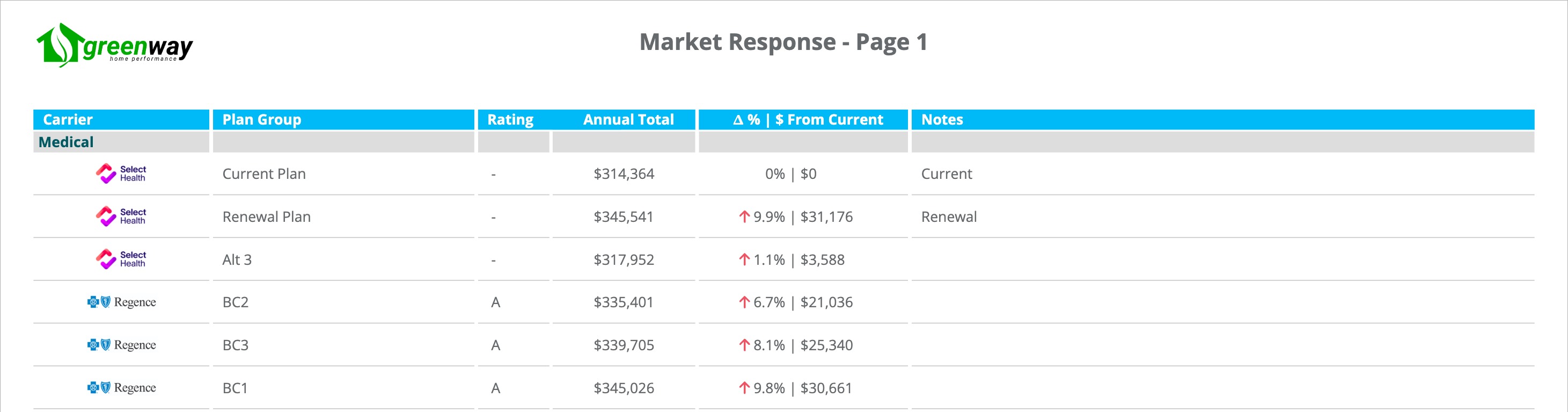
Renewal summary and market response
The side-by-side spreadsheets
Contribution pages, employee by employee
Rate tables and member level cost
The plan comparison table
Employee worksheets with SBC links
Want these pages built from one of your own groups?
Book a Discovery CallWhat it connects to.
Elected plan data moves on its own, so nobody rekeys it downstream.
BenefitPoint
Bi-directional, 16 agencies in production, Vertafore Orange Partner
Employee Navigator
Elected plan data on selection
Brite
Elected plan data on selection
Ideon
Small group rates, refreshed daily
Open REST API
For anything else you need to connect
Who it fits, and where it is strongest.
The useful version of no restrictions is the one that also tells you where the deployed book actually sits.
Brokerages
Built for teams that market renewals. Drafting the RFP, chasing carriers, and reading the proposals back only happen when you take a group to market, so the value tracks how much of your book you market each year, not how many groups you have. The ten steps of a marketed renewal show which you should actually use.
Group sizes
2 lives to 70,000 and beyond. Strongest in the 15 to 500 life range, where most of the deployed book sits.
Funding types
Community-rated, level-funded and underwritten mid-market, large-group fully insured, fully unbundled self-funded.
Carriers
Approximately 1,000 configured, all 50 states, more added on request.
Beyond the core lines
Medical, including ASO and PBM administration, pharmacy, stop-loss, and the full worksite and voluntary set.
Two details people ask about
Employee classes
Supported on short- and long-term disability and basic life, with different benefit levels per class
Networks
Captured as a plan attribute, and filterable when you are selecting plans
For the person this gets forwarded to
What your IT and compliance team will ask.
Collected in one place so your champion can forward this section instead of opening a ticket with us.
Examination
SOC 2 Type II, Security and Privacy criteria
Health data
HIPAA aligned, BAA included
Encryption
AES-256 at rest, TLS 1.2+ in transit
Hosting
United States regions only
Access
SAML SSO
AI handling
Anthropic enterprise API, United States only, zero data retention, never used to train models
Your data
Never shared with another brokerage. Export all of it at any time at no cost
Staffing
Staff, development, and support are all United States-based
Extraction accuracy
94.79% field level against human-verified ground truth, Q3 2026
You are running renewals the week you start.
Onboarding
Three to five business days
Your account is provisioned in three to five business days, plus one to two for each additional office. Teams can run renewals the day the account is live.
Training
Guided working sessions
Built around how your team actually works, with guided sessions until they are running renewals on their own. Instructional videos are available within the application at the point you need them.
Features
Frequently Asked Questions

No. PlansightAI™ does the math and builds the options. Your team builds the recommended packages and decides what the client sees. Nothing reaches a client until a named reviewer signs off.

Yes. Every page recalculates live when the client asks what if, so a scenario takes 5 to 10 minutes in the meeting instead of the 20 to 40 it takes today.
Yes. SmartSheetingAI™ audits the certificate the carrier issued against the proposal they sold, and every variance links back to the source document. It takes under two minutes per plan.
Three things: a client-ready presentation as a PDF built against your templates, a normalized side-by-side in Excel in your own template, and elected plan data pushed to your enrollment and AMS systems.
Yes. Small group is priced straight off the rating engine. Upload the census or pull it from Employee Navigator, and PlansightAI™ prices every plan in the group’s rating area, age banded or composite, with the same client presentation at the end as a marketed renewal.
Every RFP goes out with a secure upload link. The carrier drags the quote in without an account and without emailing you, and it lands in your task list already read. Quotes that arrive another way can be uploaded directly, one at a time or thirty at once.
No. AI processing runs on the Anthropic enterprise API, United States only, with zero data retention, and your data is never used to train models. It is never shared with another brokerage, and you can export all of it at any time at no cost.